Cartoonify: AI Photo Editor
- 5.0
- Rating
- 10.00K
- Installs
- Free
- Price
 Analysis by App-foxy
Turning an ordinary photo into something playful is easy to understand, but getting a result that actually looks good takes more than pressing an effect button. I spent time with Cartoonify: AI Photo Editor to see where it fits in a real photo-editing routine, especially for people who want quick 3D cartoon portraits, face swaps, and AI-assisted creative edits without opening a complicated desktop program. My overall impression is that it is most appealing when you treat it as a fast idea generator rather than a complete replacement for a traditional editor.
The app comes from Aykonu and sits in the Art & Design section. It is free to install, with optional in-app purchases ranging from $4.99 to $29.99 per item. That makes it easy to try before deciding whether its more advanced creative tools deserve a place in your regular workflow. It is rated for Everyone, runs on Android 7.0 or later, and the current version is 1.0.2.
How I built a reliable starting workflow
I found the best results by beginning with a photo that already has a clear subject. A face looking toward the camera, even lighting, and a reasonably uncluttered background give the AI much less visual confusion to resolve. This is not a special trick for one particular portrait style; it is simply the difference between asking the editor to interpret a readable image and asking it to rescue a difficult one.
You May Also Like

 AccuWeather: Weather Radar
AccuWeather Review: A Quick, Clear Forecast for Everyday Decisions
For everyday plans, the best forecast is the one you can understand quickly. AccuWeather makes rain timing, radar, and local conditions easy to act on, with a few trade-offs.

 Hill Climb Racing
Why Hill Climb Racing Still Turns Crashes Into One More Run
A tiny car, a bumpy hill and one more upgrade: Hill Climb Racing keeps resurfacing because its simple chaos makes every near-miss feel personal.

 AliExpress - Shopping App
AliExpress Makes Global Shopping Feel Personal, but Shoppers Bear the Risk
AliExpress turns a global marketplace into a pocket-sized discovery engine. Its reach is useful, its shopping loop compelling, and its trade-offs easy to miss.

 Lords Mobile: Kingdom Wars
Lords Mobile Is a Kingdom-Building Routine, Not a Quick Match
A case-by-case verdict on the building, battles, device demands, and social commitments that make Lords Mobile rewarding for some players and exhausting for others.

 PDF Scanner app - TapScanner
TapScanner Makes Paperwork Easier to Capture, Check, and Share
TapScanner makes scanning with a phone feel less like a rescue operation and more like a dependable step in getting work done. Its capture tools are useful, though not flawless.

 Block Blast!
Block Blast! Shows How Much a Puzzle Game Can Leave Out
A quiet grid game shows why puzzle players increasingly value instant clarity, repeatable skill and low-pressure play—and where the genre still needs to catch up.
More From Our News Desk
View All News


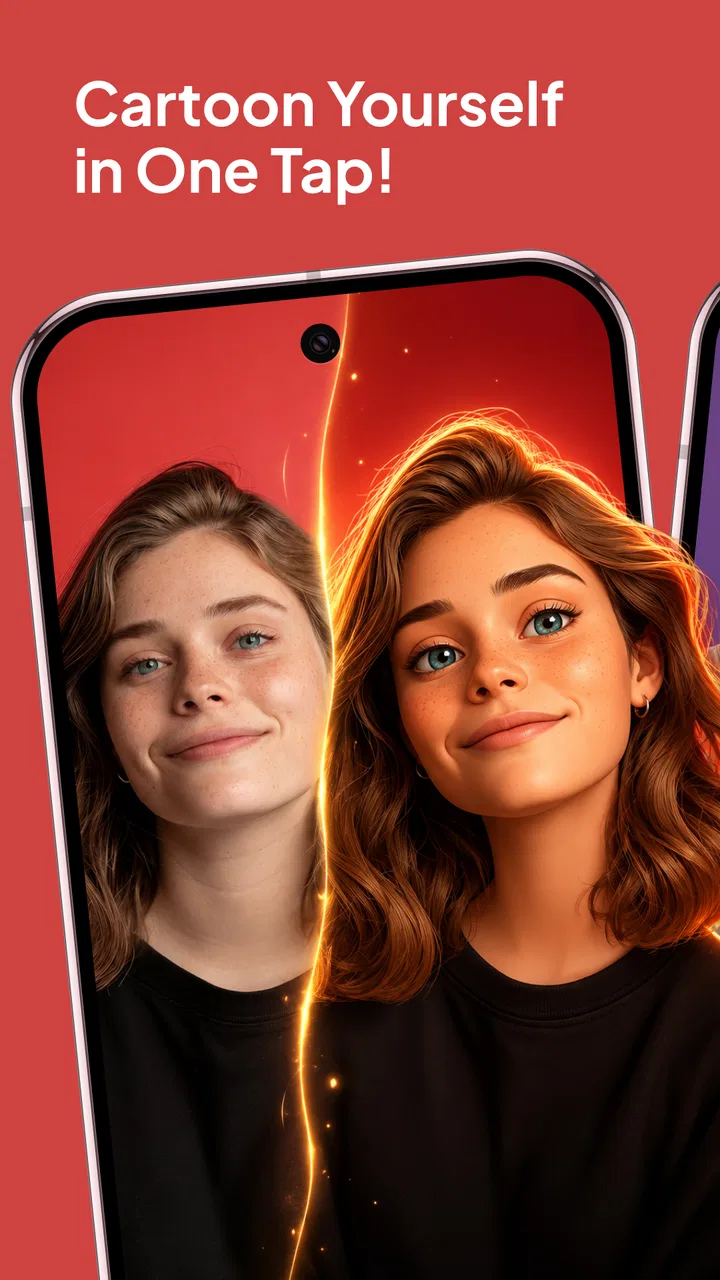
My usual first pass was deliberately simple. I selected one image, tried the cartoon treatment, and judged the whole composition before worrying about small details. A cartoon effect can make a face more expressive while also exaggerating hair, glasses, shadows, or the outline of clothing. If the source picture is already busy, the transformed result may feel noisy rather than stylized.
That makes this app useful for quick profile-picture experiments, birthday greetings, casual social posts, and private creative projects. I would not begin with a large batch of important family photographs. Instead, I would test one representative image and learn how the transformation handles that person’s face, hairstyle, and lighting.
A realistic everyday example is a weekend group chat. You take a clear portrait of a friend, turn it into a cartoon, and send it as a lighthearted birthday message. The value is not that the app replaces a professional illustrator; it is that the path from photo to shareable idea is short. If the first result feels too dramatic, you can return to the source and try a different picture rather than spending an hour rebuilding the image manually.
The 3D cartoon approach is especially suited to portraits where the subject is easy to recognize. It can give a familiar photograph a more animated, toy-like personality. I liked that this makes the app approachable for people who do not know how to work with layers, masks, brushes, or complex adjustment panels. The trade-off is control: a traditional editor lets you decide exactly which areas change, while an AI transformation makes broader decisions for you.
Face swaps require a slightly different mindset. They are better treated as playful compositing experiments than as dependable identity-preserving edits. I would choose images with similar head angles and comparable lighting when possible. If one face is in profile and the other faces forward, or if one image is brightly lit while the other is heavily shadowed, the result is more likely to look artificial.
That limitation does not make the feature useless. It simply means the input choices matter more than a casual user might expect. For a humorous image, an imperfect swap can still be entertaining. For a polished result, I would spend more time selecting compatible source photos than repeatedly pressing the same effect on unsuitable ones.
Smart AI tools are most useful when they shorten the distance between an idea and a visual draft. I see them as a way to explore possibilities quickly: a cartoon portrait, a playful variation, or a face-swap concept that can later be refined elsewhere. If your goal is precise retouching, color correction, typography, or print-ready artwork, the app is not the whole process.
Small preparation choices make a large difference
Before importing a picture, I would crop away distractions that do not contribute to the subject. A lamp, another person at the edge, or a patterned background can pull the transformation in an unexpected direction. Keeping the face and shoulders prominent gives the effect a stronger visual anchor.
I also recommend keeping the original image untouched. Save or retain the source, then compare the transformed version against it. This is particularly important with face swaps and exaggerated cartoon styles, where the result may look amusing at first but lose the person’s recognizable features after closer inspection.
Another practical habit is to judge the result at the size where it will actually be used. A portrait that looks convincing as a small chat image may reveal rough edges when enlarged. Conversely, tiny imperfections may not matter at all for a casual social post. This helps prevent wasting time trying to perfect details that the final audience will never notice.
Settings and choices worth checking before you commit
Because the app’s appeal is speed, it is tempting to accept the first result. I think experienced users should pause long enough to inspect the available choices around each creative tool. The important question is not only which effect looks strongest, but which one preserves the subject and suits the intended destination.
For a profile image, I prefer a treatment that keeps the face readable at a small size. For a joke or reaction image, a more exaggerated look may be the better choice. For an art experiment, the most unusual result can be the most valuable, even if it is not technically realistic. The right setting depends on the job, and there is no benefit in judging every output by the same standard.
When working with face swaps, I would inspect the edges around the jaw, hairline, and glasses. Those areas often reveal whether the source images were compatible. A swap can appear acceptable in the center of the face while looking noticeably disconnected around the outline. If that happens, changing the source image is usually more productive than expecting another attempt to solve a mismatch in angle or lighting.
For cartoon conversions, I pay attention to skin tone, hair texture, and background separation. A strong effect may simplify details in a charming way, but it can also flatten important differences between people. If the image is meant as a gift, preserving recognizable features matters more than choosing the most dramatic style.
The free entry point is helpful because it lets you explore the basic experience before spending money. At the same time, I would check whether a desired tool or result is connected to an optional purchase before planning a large project around it. The listed purchase range is $4.99 to $29.99 per item, so the sensible approach is to try the workflow first and only pay when it solves a recurring need for you.
I would also avoid assuming that an AI editor can replace every part of a normal photo application. Cartoonify is focused on transformation and playful manipulation. A conventional editor is usually better for careful cropping, exposure correction, selective retouching, detailed color work, or preparing a consistent set of images. The two types of apps can complement each other: use this one to create the distinctive visual treatment, then use a more controlled tool if the final image needs cleanup.
How I decide whether a result is worth keeping
I use three simple checks. First, is the main subject still recognizable? Second, does the style match the purpose of the image? Third, would I be comfortable showing the result without explaining what went wrong? These questions sound basic, but they prevent the common mistake of keeping an image merely because the transformation is technically impressive.
This approach is also useful for deciding when to stop. AI effects encourage endless variations, yet more attempts do not always produce a better image. If the source photo is poor for the chosen tool, I would switch photos instead of repeating the same process. If the output is already clear and amusing, I would save time and use it.
Faster patterns for repeat use
The quickest workflow I found was to separate experimentation from delivery. First, test the effect on a single photo. Once you understand the visual direction, choose the final source image and make the version intended for sharing. This avoids polishing an early experiment that was never the right fit.
I would keep a small mental checklist for each type of edit. For a cartoon portrait, look for a forward-facing subject and a simple background. For a face swap, look for matching angles and similar lighting. For a general AI experiment, decide in advance whether you want a realistic result or a deliberately exaggerated one. That decision makes it easier to reject outputs that are attractive but unsuitable.
Another efficient pattern is to prepare the photo outside the app only when preparation clearly helps. A tight crop can improve focus, but heavy editing before the AI transformation may introduce artifacts or remove details the tool needs. I would make only the simplest adjustment first, then let the app perform its creative work.
For recurring projects, consistency is more valuable than novelty. If you are making a set of cartoon portraits for a group, use source photos with broadly similar framing. The results will not become identical, but they will feel more connected. Mixing a close-up selfie, a distant full-body shot, and a dim indoor photo makes the set look uneven even if each individual transformation is acceptable.
This is one of the app’s less obvious trade-offs: it is fast at producing individual ideas, but consistency across many images depends heavily on the user. I would choose it for a small themed collection, not for a large professional identity system where every portrait must follow exact visual rules.
For social sharing, I would inspect the image after any crop required by the destination. A face that looks perfectly placed in the editor can become awkward when forced into a square or narrow preview. Framing the subject with the final display shape in mind is a simple habit that improves the result without needing another effect.
People often ask whether an app like this is suitable for children because the content rating is Everyone. The rating makes it broadly accessible, but I would still guide younger users when they are experimenting with other people’s faces. A face swap can be funny among friends, yet consent and context matter when an edited image is shared publicly. The creative tool is easy to use; responsible use still depends on the person behind it.
Another practical question is whether an older phone can run it. The minimum operating-system requirement is Android 7.0, which covers a wide range of devices, but compatibility with an operating system does not guarantee identical speed on every handset. AI image processing can feel more comfortable when you work with one image at a time and avoid treating the app like a high-volume production tool.
Where the creative approach reaches its limits
The main limitation is the same feature that makes Cartoonify approachable: automation. You get speed and surprise, but not the fine-grained control of a layer-based editor. If you need to preserve a specific facial detail, correct one small area, or direct the exact shape of a cartoon outline, you may reach the app’s boundary quickly.
I would also be cautious with images that contain several faces, unusual poses, dramatic shadows, or strong obstructions. AI tools can still create interesting results from difficult photos, but the output becomes less predictable. That unpredictability is enjoyable for experimentation and frustrating when you need a dependable likeness.
Face swaps deserve particular care because realism is not guaranteed simply because the source faces are clear. Hair, ears, jawlines, and lighting transitions can expose the edit. For a private joke, that may be completely acceptable. For a public-facing image, I would review the entire frame rather than focusing only on the swapped face.
There is also a creative limitation in relying too heavily on one-click styles. If every image receives the same treatment, the work can start to feel repetitive. I would use the app to discover a direction, then vary the source composition, subject, and purpose rather than expecting the effect alone to create a complete visual identity.
Compared with ordinary camera filters, this app offers a more substantial transformation. A conventional filter usually changes color, contrast, or mood while leaving the photograph fundamentally intact. Cartoonify is more suitable when you want the image to become a character-like interpretation. Compared with professional art software, however, it gives up precision in exchange for convenience.
That comparison helps clarify who should skip it. I would not choose it as my primary tool for commercial retouching, detailed illustration, print production, or work requiring repeatable technical specifications. I would also skip it if my only goal were subtle brightness and color correction. A standard photo editor would be faster and more predictable for those tasks.
On the other hand, I think it is a strong fit for casual creators, social-media users, families making playful gifts, and anyone curious about AI image transformations without a steep learning curve. The free installation lowers the risk of trying it, while the optional purchases mean regular users should decide carefully which capabilities they genuinely need.
The app has reached over ten thousand installs and holds a five-point average from fourteen ratings, with three written reviews. Those figures suggest an encouraging early response, although they are not a substitute for testing it with your own photos. AI image tools can feel excellent with one person’s face and less convincing with another’s, so the most honest evaluation is a short personal trial.
My verdict on building skill with Cartoonify
After using it as a creative shortcut, I see Cartoonify: AI Photo Editor as a focused tool for turning familiar photos into playful visual experiments. Its strongest quality is immediacy: you can start with a normal portrait and quickly explore a cartoon interpretation or a face-swap idea without learning a complicated editing system.
The best results come from repeatable habits rather than random tapping. Choose a readable source image, match face angles for swaps, keep the original, inspect the whole frame, and judge the result according to where it will be shared. Those steps sound modest, but they make the difference between an effect that feels intentional and one that looks like an accidental filter.
I also appreciate that the app is easy to approach while still leaving room for judgment. It does not remove the need to choose good photos, compare outcomes, or recognize when another editor is more appropriate. In my experience, that balance is healthy: the AI handles the imaginative first pass, while I remain responsible for the final decision.
My recommendation is simple. Try it if you want quick cartoon portraits, playful face swaps, or a low-pressure way to explore AI-assisted art. Start with a few personal images before considering an optional purchase, and do not expect professional retouching controls. If you understand that trade-off, this free Art & Design app from Aykonu can be a genuinely enjoyable addition to a mobile creative toolkit.
My final advice: use it for fast visual ideas, choose your source photos carefully, and keep a more precise editor nearby when the image needs exact control.
FAQs for Cartoonify: AI Photo Editor
01What is Cartoonify: AI Photo Editor, and what can it do?
Cartoonify: AI Photo Editor is designed to transform ordinary photos into cartoon-style portraits and illustrated images using artificial intelligence. After selecting a picture from your gallery or taking a new one, you can usually apply different artistic effects, adjust the result, and save or share the finished image. Results may vary depending on lighting, image quality, facial details, and the selected filter.
02Is Cartoonify: AI Photo Editor free to download and use?
The application may be available to download at no initial cost, but some features, filters, export options, or editing tools can be restricted behind in-app purchases or a subscription. Before confirming payment, check the pricing page carefully and review whether a free trial automatically converts into a paid plan. Availability of features and prices can also differ between Android and iOS.
03Does Cartoonify require an internet connection to create cartoon images?
Many AI photo editors process images through online servers, so Cartoonify may require an active internet connection for certain effects or for generating the final cartoon image. Basic editing tools, if included, might work offline, but this should not be assumed. Using the app over mobile data can also consume data, especially when uploading high-resolution photos or downloading processed results.
04Are photos uploaded to Cartoonify safe and private?
Before using the application, review its privacy policy and permission requests to understand how uploaded photos are handled. AI processing may involve sending images to remote servers, and the app could collect technical or usage information depending on its settings. Avoid uploading sensitive photographs unless you are comfortable with the stated data practices, and remove unnecessary permissions whenever your device allows it.
05What kind of photos produce the best results in Cartoonify?
Cartoonify generally works best with clear, well-lit photos in which the subject’s face is visible and not heavily obstructed by sunglasses, hats, hands, or other people. Front-facing portraits with good contrast usually produce more recognizable results than dark, blurry, or extremely small images. For stronger outcomes, use an original high-resolution photo and experiment with several available styles rather than relying on one filter.
Pros
- Turns ordinary selfies into fun cartoon-style portraits quickly.
- Offers multiple artistic styles for different moods and occasions.
- Simple controls make editing accessible for beginners.
- Useful for creating distinctive profile pictures and social posts.
- Previewing results before saving makes experimenting easy.
Cons
- Some advanced styles may require a subscription or extra credits.
- AI results can vary noticeably depending on lighting and photo quality.
- Facial details may look distorted in certain generated portraits.
- Processing can take longer when servers are busy.
- Exported images may include limits on resolution or customization.

Cartoonify: AI Photo Editor
Gallery